Managing production container environments manually is tedious and error-prone: images update quickly and security fixes are released constantly. By combining Renovate, GitHub Actions, and GitOps, this process can be fully automated:
- Renovate regularly checks the deployed container images and creates pull requests for updates.
- GitHub Actions handles the automation of Renovate runs.
- Any GitOps tool can automatically deploy changes from the Git repository to the Docker environment.
This creates a clean GitOps workflow for Docker updates.
The renovate-config Repository#
It’s a best practice to maintain a separate repository for Renovate configuration, e.g., renovate-config.
This way, you can monitor multiple repositories from a single configuration.
Renovate runs via a GitHub Action inside this repository and monitors the specified repositories.
Inside your renovate-config repository, create a config.js file.
Renovate Configuration#
You can find my example configuration in the renovate-config repository:
module.exports = {
    platform: 'github',
    token: process.env.RENOVATE_TOKEN,
    gitAuthor: `${process.env.RENOVATE_AUTHOR} <${process.env.RENOVATE_PRIVATE_EMAIL}>`,
    username: process.env.RENOVATE_USERNAME,
    repositories: [`${process.env.RENOVATE_USERNAME}/docker-compose`, `${process.env.RENOVATE_USERNAME}/stacks`],
    onboarding: false,
    requireConfig: 'optional',
    hostRules: [
        {
            matchHost: 'docker.io',
            username: process.env.RENOVATE_DOCKER_HUB_USERNAME,
            password: process.env.RENOVATE_DOCKER_HUB_PASSWORD,
        },
        {
            matchHost: 'ghcr.io',
            username: process.env.RENOVATE_GHCR_USERNAME,
            password: process.env.RENOVATE_GHCR_TOKEN,
        }
    ],
    allowedCommands: ['^curl -s -X POST "' + process.env.RENOVATE_NTFY_URL + '" .*'],
    postUpgradeTasks: {
        commands: [
            `curl -s -X POST "${process.env.RENOVATE_NTFY_URL}" -H "Authorization: Bearer ${process.env.RENOVATE_NTFY_TOKEN}" -H "X-Tags: twisted_rightwards_arrows" -H "X-Title: Renovate - {{{depName}}}" -d "{{{prTitle}}}"`
        ],
        executionMode: 'branch'
    }
};Credentials (e.g., Docker Hub or GitHub Container Registry) must come exclusively from GitHub Secrets.
You can customize the configuration as needed.
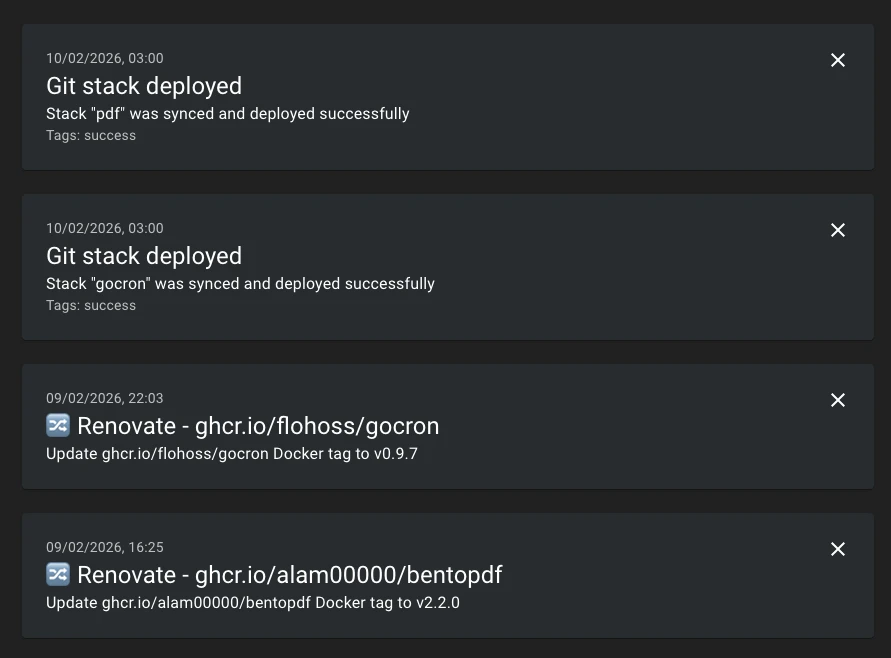
I use ntfy notifications to inform me whenever Renovate creates a pull request with the postUpgradeTasks option.
GitHub Action Workflow#
The corresponding GitHub workflow controls the Renovate execution:
name: renovate

on:
  workflow_dispatch:
  schedule:
    - cron: '0 13 * * *' # 15:00 CEST (summer), 14:00 CET (winter)

jobs:
  renovate:
    name: renovate
    runs-on: ubuntu-latest
    steps:
      - name: Checkout
        uses: actions/checkout@v7
      - name: Run Renovate
        uses: renovatebot/github-action@v46.2.1
        with:
          token: ${{ secrets.RENOVATE_TOKEN }}
          configurationFile: ${{ github.workspace }}/config.js
        env:
          RENOVATE_AUTHOR: ${{ vars.AUTHOR }}
          RENOVATE_PRIVATE_EMAIL: ${{ secrets.PRIVATE_EMAIL }}
          RENOVATE_USERNAME: ${{ github.actor }}
          RENOVATE_DOCKER_HUB_USERNAME: ${{ vars.DOCKER_HUB_USERNAME }}
          RENOVATE_DOCKER_HUB_PASSWORD: ${{ secrets.DOCKER_HUB_PASSWORD }}
          RENOVATE_GHCR_USERNAME: ${{ vars.GHCR_USERNAME }}
          RENOVATE_GHCR_TOKEN: ${{ secrets.RENOVATE_TOKEN }}
          RENOVATE_NTFY_URL: ${{ vars.NTFY_URL }}
          RENOVATE_NTFY_TOKEN: ${{ secrets.NTFY_TOKEN }}
Renovate Configuration in Compose Repositories#
Through the renovate.json file, you can set rules to determine which images are updated or restricted to certain versions.
Check out my stacks repository and its renovate.json file as an example:
{
  "$schema": "https://docs.renovatebot.com/renovate-schema.json",
  "extends": ["config:recommended"],
  "assignees": ["flohoss"],
  "prHourlyLimit": 0,
  "dependencyDashboard": false,
  "packageRules": [
    {
      "matchDatasources": ["docker"],
      "matchPackageNames": [
        "docker.io/valkey/valkey",
        "ghcr.io/immich-app/postgres"
      ],
      "enabled": false
    },
    {
      "matchDatasources": ["docker"],
      "matchPackageNames": ["redis"],
      "allowedVersions": "8.x"
    },
    {
      "matchDatasources": ["docker"],
      "matchPackageNames": ["postgres"],
      "allowedVersions": "17.x"
    },
    {
      "matchDatasources": ["docker"],
      "matchPackageNames": ["mariadb"],
      "allowedVersions": "10.x"
    },
    {
      "matchDatasources": ["docker"],
      "matchPackageNames": ["cryptpad/cryptpad"],
      "versioning": "regex:^(?<major>\\d+)\\.(?<minor>\\d+)\\.(?<patch>\\d+)$",
      "extractVersion": "^version-(?<version>.+)$"
    },
    {
      "matchDatasources": ["docker"],
      "matchPackageNames": [
        "ghcr.io/immich-app/immich-machine-learning",
        "ghcr.io/immich-app/immich-server"
      ],
      "groupName": "Immich",
      "groupSlug": "immich",
      "separateMinorPatch": false,
      "separateMultipleMajor": false
    },
    {
      "matchDatasources": ["docker"],
      "matchPackageNames": [
        "dock.mau.dev/mautrix/signal",
        "dock.mau.dev/mautrix/telegram",
        "dock.mau.dev/mautrix/whatsapp",
        "dock.mau.dev/mautrix/meta"
      ],
      "groupName": "Mautrix",
      "groupSlug": "mautrix",
      "separateMinorPatch": false,
      "separateMultipleMajor": false
    },
    {
      "matchDatasources": ["docker"],
      "matchPackageNames": [
        "ghcr.io/dongdongbh/mindwtr-cloud",
        "ghcr.io/dongdongbh/mindwtr-app"
      ],
      "groupName": "Mindwtr",
      "groupSlug": "mindwtr",
      "separateMinorPatch": false,
      "separateMultipleMajor": false
    },
    {
      "matchDatasources": ["docker"],
      "pinDigests": true
    }
  ]
}
Examples:
- Redis will only be updated within major version 7.
- Postgres will only be updated within major version 17.
- All images are digest-pinned for reproducible builds.
GitOps with Portainer, Dockhand, etc.#
Finally, a GitOps tool continuously deploys the changes to your Docker environment. I use Dockhand for this purpose, but many other tools are available.
Once you merge the Renovate PRs, the GitOps tool automatically pulls the changes and redeploys the stacks referencing the updated Git repository.
Result#
- Notifications/Pull-Requests when new versions are available.
- All changes are versioned and traceable via Git.
- The GitOps tool ensures automated deployment in the Docker environment.