I’ve been using GrapheneOS on my smartphone for two months now – and I have to say: I’m impressed. For a long time, I was looking for a mobile operating system that focuses on privacy, security, and control, without limiting me in everyday use. With GrapheneOS, I’ve finally found it.
Why I Switched#
There are many reasons why I decided to switch from iOS to GrapheneOS. I am a very curious user who likes to tinker with technology and explore new possibilities. Even though I was happy with my iPhone, I felt increasingly restricted by the closed ecosystem and lack of customization options.
Open Source Software#
For many years, I used Apple devices – and while the experience was smooth, it felt increasingly restrictive once I started experimenting with self-hosted services.
I began hosting my own tools and services to gain independence:
- Immich for photo management
- Matrix for chat and communication
- Nextcloud for files and calendar
- Ntfy for push notifications
- Home Assistant for home automation
- Jellyfin for media streaming
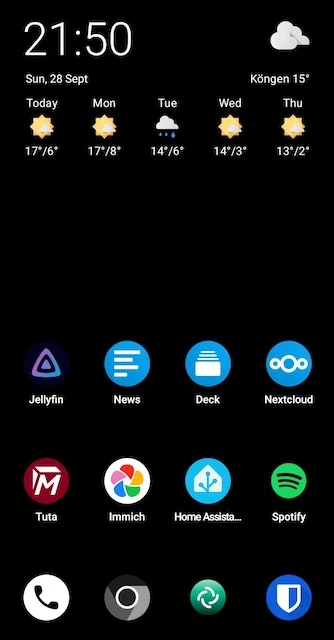
Especially with Ntfy, I noticed that Android handles WebSockets much better than iOS. This was one of the key reasons that pushed me to finally switch to GrapheneOS.
Vender Lock-In#
One of the biggest issues with mainstream mobile operating systems is the vendor lock-in. Both Apple’s iOS and Google’s Android are designed to keep users within their ecosystems, making it difficult to use alternative services or apps.
Apple has been very aggressive in locking down their ecosystem, making it nearly impossible to use third-party app stores or services without jailbreaking the device. Google, while more open, still heavily integrates its services into Android, making it challenging to avoid using Google Play Services.
Using iCloud for almost 10 years now, I never had any issues with data loss or reliability. However, I felt increasingly uncomfortable with the amount of data Apple collects and the lack of control over my own information. What if i want to use self-hosted alternatives or services that respect my privacy? GrapheneOS allows me to do just that.
I started using osxphotos to export my photos from iCloud as a backup solution if apple decides to lock me out of my data one day.
Photos are my most important data on my phone, and I want to ensure I have full control over them.
Using Immich as a self-hosted photo management solution in iOS is full of limitations.
My Profile Setup#
One of the biggest advantages of GrapheneOS is the ability to create and strictly separate multiple profiles. My current setup looks like this:
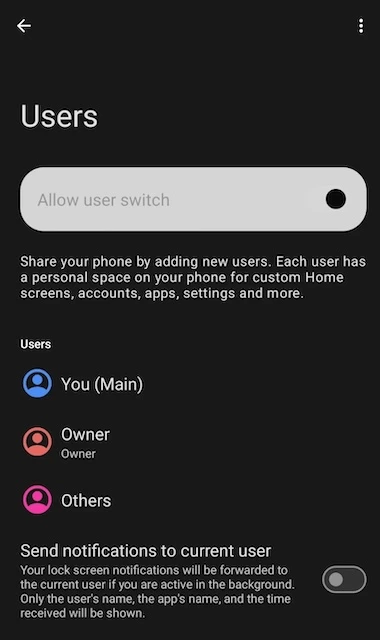
- Profile 1 (Owner): Contains app stores like Obtainium, Aurora Store, and Accrescent for installing apps. This profile remains isolated and doesn’t hold user data – it’s my “clean” base profile that always exists.
- Profile 2: This is where the apps from the Owner profile are actually used with my personal data. If there’s ever a problem, error, or security issue, I can simply recreate this profile without affecting the Owner profile.
- Profile 3: Contains the Google Play Store and all apps that require Play Services, including social media.
The best part: social media and notifications no longer distract me in everyday life. I only see them when I deliberately switch to the third profile. This keeps my daily routine calmer and more focused, while still allowing access to those apps when I choose.
Additional Benefits#
Beyond profiles, GrapheneOS comes with many small but crucial improvements:
- System hardening against exploits and vulnerabilities
- More fine-grained permission controls, e.g. apps can be denied access to sensors like camera or microphone
- Frequent security-focused updates
- Option to use Google services in a sandbox environment, if absolutely needed
- Excellent battery life thanks to Unified Push with Ntfy, so apps don’t need to run constantly in the background
Challenges & Limitations#
Of course, GrapheneOS isn’t perfect. Here are the main challenges I’ve encountered:
- Home Assistant Matter Support: While Home Assistant works great overall, commissioning Matter devices via smartphone is not supported on GrapheneOS. The official commissioning flow requires Google Play services that don’t work properly in GrapheneOS’s sandboxed environment. However, there’s a workaround: you can commission devices directly via a Bluetooth adapter connected to your Home Assistant server using the Matter Server’s Python client, or use a Linux machine with chip-tool to bridge devices before fully commissioning them to Home Assistant. It’s more technical, but it works.
- App Compatibility Issues: Some manufacturers use aggressive security checks that flag GrapheneOS as a threat. The most prominent example is Kia’s mobile app, which recently started refusing to run, throwing a “security risk detected” error. Kia’s support response was dismissive, suggesting users should buy a standard Android device instead. Some older versions still work, but this is a frustrating limitation for car owners. Similar issues can occur with banking apps, though this varies by bank and has not affected me personally.
These limitations are edge cases for most users, but worth knowing if you rely on specific apps or smart home integrations. The important takeaway: most limitations have workarounds, they’re just not as seamless as on stock Android.