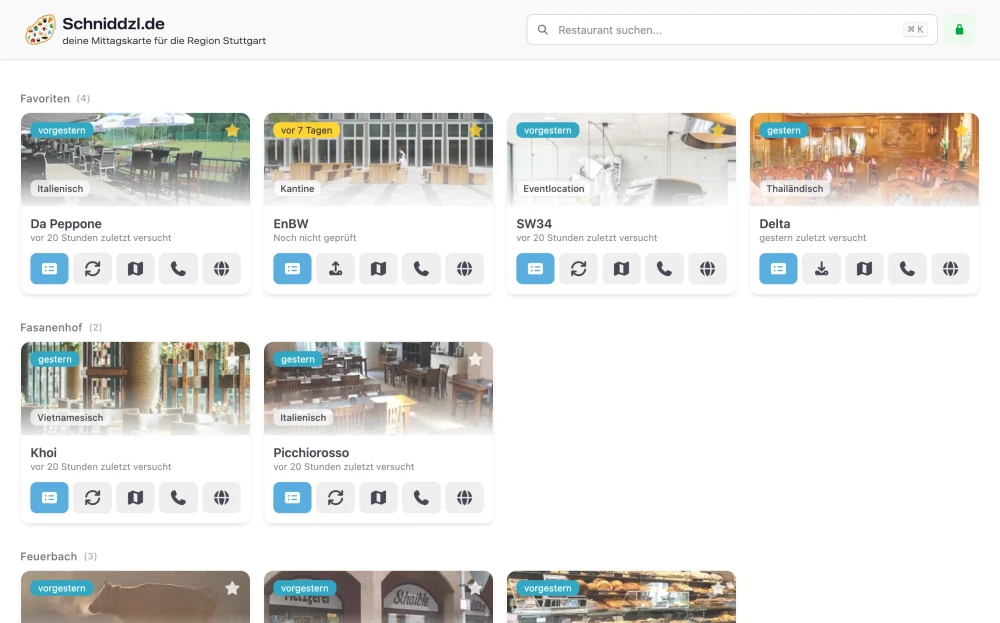
Want to see the current version of Mittagskarte in action? Visit schniddzl.de.
Building a menu scraper and aggregator has been a journey full of technical decisions and lessons learned. My main goal was to create a better user experience (UX) for people searching for daily menus, but the path to a smooth, reactive app was not straightforward. Here’s how the project evolved, what I tried, and what I learned along the way.
2022: Project Origins#
In early 2022, while working at BRAINORITY Software GmbH, I noticed a recurring problem: every lunchtime, we would manually search multiple websites to find the current lunch menus. This process was time-consuming and inefficient. To solve this, I quickly built a tool that scraped these sites and presented the collected information in one place.
My initial approach was quite opportunistic. I tried scanning PDFs, HTML, and images to extract plain text and prices, so users could even set up their own price discounts. However, this turned out to be overly complicated—any small change on a restaurant’s website would break the process and require manual fixes.
The first frontend was basic and not very user-friendly, but it worked as a proof of concept. I started with a Vue frontend and a Go backend, but soon realized that for a project focused on scraping and presenting data, a complex frontend wasn’t necessary.
Technology used: Go, Vue, PostgreSQL, Redis, Docker, Goquery
2023–2024: Early Iterations#
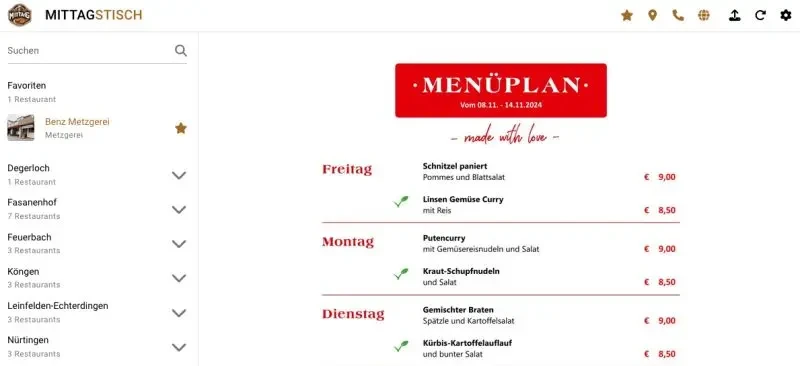
After the initial launch, I went through several iterations to make the application more robust and easier to maintain. Some of the key changes and challenges during this period included:
- Experimenting with different Go backend approaches: plain HTML rendering, combining with a Vue.js frontend, or using templ-based rendering directly in the backend
- Using PostgreSQL for menu history storage and Redis for fast data access
- Switching configuration from the database to YAML, then to JSON, to better handle the unique requirements of each restaurant
- Leveraging regex in pure Go and the goquery library for jQuery-like DOM manipulation
- Parsing PDFs and websites, which made it possible to compare prices and search for specific dishes
By 2024, the stack had evolved to a lean Go backend, a Quasar frontend, and an OpenAPI interface with automated code generation. There was no OCR, no price adjustment, no search, and no unnecessary features—just the essentials.
Websites change too frequently to scrape everything perfectly, so I started using Playwright to create screenshots of menus. This approach is more reliable for dynamic content and less likely to break due to SSL changes, JavaScript updates, or other website modifications. Existing menus in PDF or image format are downloaded and converted into efficient WebP images.
I removed OCR because it was unreliable and often produced inaccurate results, especially with complex layouts or low-quality images. By using screenshots or PDFs directly, I could ensure the menu was captured as it appeared on the website, without worrying about the intricacies of text extraction.
Moving configuration from the database to a single YAML file made it much easier to manage and update restaurant settings without touching the database for every change.
Technology used: Go, Quasar, PostgreSQL, Redis, Docker, Playwright, YAML configuration files
2025: Evolution, New Domain & Technical Shifts#
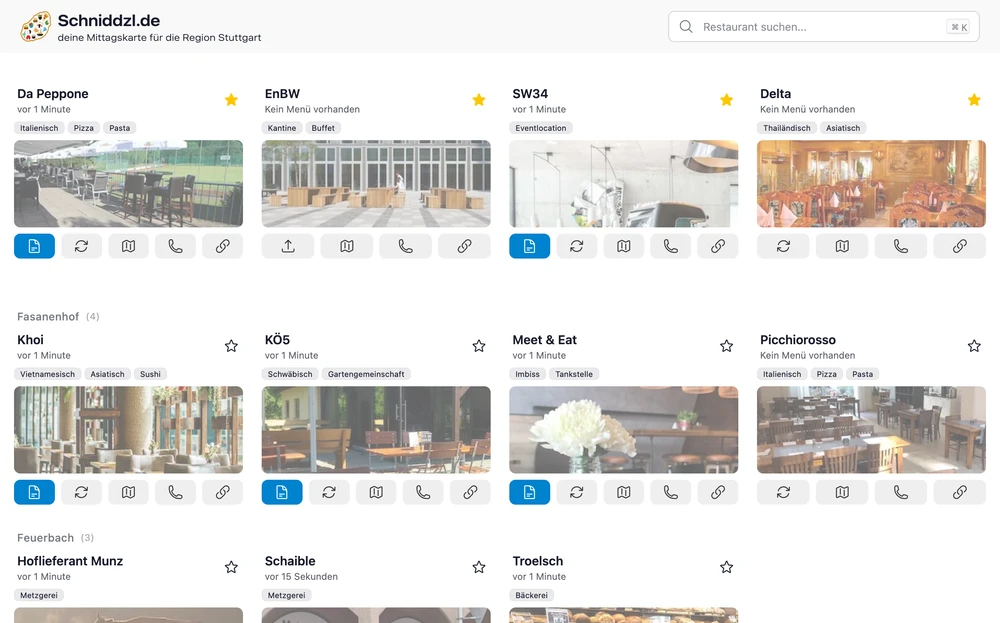
In 2025, I decided to take the project to the next level. My main motivation was to improve the user experience and make the application easier to maintain. After experimenting with various tech stacks and architectures, I settled on a fully backend-rendered solution using Go and templ, with htmx for interactivity. This allowed me to simplify the architecture while still providing a responsive and dynamic user interface.
The constant struggle to keep up with changing websites made me realize the need for a more robust solution. I also wanted to make the project open source so others could contribute and benefit from it.
New domain: The project now runs under schniddzl.de (a Swabian nod to “Schnitzel”) and is available as open source on my GitHub page.
What changed technically:
- A leaner backend: no OCR, no price adjustments, no unnecessary features—just what’s needed
- Automated screenshots with Playwright to reliably capture menus from PDFs or webpages
- Existing PDFs and images efficiently converted and embedded as tooltips for quick access
- Configuration consolidated into a single file for easier customization
- htmx and Floating UI used to add interactivity to server-rendered pages without heavy frontend frameworks
Technology used: Go, templ, Tailwind, Daisy UI, Playwright, Docker, YAML configuration files
2026: Current State & PocketBase Integration#
By 2026, the project had evolved even further. It is no longer backend-rendered, but now features a split backend and frontend: a Go API for the backend and a Vue.js frontend. This change was driven by the need for a more modern and responsive user interface, as well as the desire to leverage the strengths of both technologies. The backend handles scraping, data processing, and API endpoints, while the frontend delivers a smooth and interactive user experience.
During this phase, I discovered PocketBase and decided to integrate it for several reasons:
- Built-in Authentication: PocketBase provides a robust authentication system out of the box, simplifying user management and access control.
- Database Management: The built-in database and admin UI make it easy to manage collections and records without setting up a separate database system.
- Extensibility with Go: PocketBase allows for custom logic to be added directly in Go, which fits well with my existing backend codebase.
- Realtime Messaging: The real-time capabilities of PocketBase enable instant updates to the frontend, improving the user experience by providing live menu updates without needing to refresh the page.
The OCR Challenge: Tesseract in Docker#
One of the more interesting technical detours was my attempt to use OCR—short for Optical Character Recognition—to extract text from menu images. The idea was simple: run Tesseract (an open-source OCR engine) inside a Docker container, feed it images, and get back usable text. In practice, this turned out to be anything but simple. Installing Tesseract and all its language data in a minimal Docker image was a hassle, and I quickly ran into issues with missing system libraries and image processing dependencies. Even when it worked, the results were often unreliable—complex layouts, low-quality scans, or odd fonts would trip up the OCR and produce garbled output.
This experience taught me that sometimes, the “clever” solution isn’t the best one. Instead of fighting with OCR, I shifted focus to more robust methods.
From OCR to Browser Automation: Playwright and Headless Chromium#
As websites became more dynamic and menus moved from static images to interactive web pages, I needed a new approach. That’s when I discovered Playwright—a Node.js library for browser automation. With Playwright, I could spin up a headless Chromium browser inside Docker, navigate to a menu page, and take a screenshot of exactly what a user would see. This was a game-changer for reliability, but it came with its own set of challenges: Chromium has a long list of system dependencies, and getting everything to run smoothly in a container required careful Dockerfile tweaks and lots of trial and error. Still, the switch from OCR to browser automation made the scraper much more resilient to website changes and reduced the maintenance burden. Sometimes, the best solution is simply the one that works—consistently and reliably.
Dynamic Date Placeholders in Selectors#
Another technical highlight is the use of dynamic date placeholders in CSS or XPath selectors. Many restaurant websites publish menus with date-specific elements—like a button or link labeled with the current weekday or date. To handle this, the scraper supports placeholders in selector locators, which are replaced at runtime with the correct date string.
For example, a selector might look like this:
locator: "//div[@class='calendar']//span[text()='{{date(format=02.01.2006, day=fr, offset=-1)}}']"This allows the scraper to automatically target, say, last Friday’s menu, or today’s, without manual intervention. Supported arguments include:
format: Go date format, e.g.,02.01.2006lang: language, e.g.,enordeday: target weekday, e.g.,moorfroffset: week offset, e.g.,-1,0,1upper: uppercase output toggle
This dynamic replacement makes the scraping pipeline much more robust and flexible, especially for sites that change their structure based on the current date. It’s a small feature, but it saves a lot of manual work and keeps the system adaptable to new menu formats.
Additional Challenges and Solutions#
Throughout the project, I encountered several unique challenges that required creative solutions:
Cloudflare Blocking: At one point, Cloudflare started blocking my scrapers. While it would have been technically possible to fake the user-agent or bypass protections, this is not legal or ethical. Instead, I implemented a feature allowing me to specify a URL that can be called directly with curl for a manual download, avoiding automated scraping for protected sites.
Uploading Files for Offline Restaurants: Some restaurants have no online presence at all. To support these, I added a frontend feature that allows users or restaurant owners to upload menu files directly through an upload modal. This ensures that even offline menus can be included in the aggregator.
Quickly Adapting to Website Changes: Websites change frequently, and locators or selectors can break overnight. With PocketBase, I can quickly update these selectors through the admin UI as a superuser, making the system much more adaptable and reducing downtime.
Detecting Menu Changes Reliably: Detecting if a menu had changed was a persistent challenge. Only after switching to using PDFs or screenshots could I reliably convert everything to the same WebP format and use file hashing to detect changes. This approach also allowed me to store a history of the last several menus, since duplicate files are not stored—only new, unique versions are kept.
Cron Scheduling for Menu Updates: Scheduling scrapes was also complex, as every restaurant releases its menu on a different schedule—some daily, some weekly, some monthly. To handle this, each restaurant has its own cron schedule, and restaurants are grouped and executed according to their update frequency.
UI Evolution for Usability: The first version of the UI displayed a separate page for each restaurant, requiring users to click and navigate to see each menu. Now, every restaurant is shown as a small card with a menu button. Using Floating UI, the current menu appears as a tooltip, making it easy to quickly glance at all menus without excessive clicking or navigation.
These challenges taught me the importance of flexibility, legal compliance, and user empowerment in building a robust menu scraper. Leveraging file hashing and flexible scheduling made the system more reliable and efficient.
Final Thoughts & Takeaways#
Building a menu scraper is much more than just fetching and displaying data. It’s a constant balancing act between reliability, maintainability, and user experience. Over the years, I’ve learned that the simplest solution is often the most robust, and that flexibility is key—whether it’s adapting to new website layouts, handling offline restaurants, or integrating new technologies like PocketBase.
Real-time updates, authentication, and a smooth UX are essential for a modern app. PocketBase helped solve many of these challenges, but the journey through different stacks taught me a lot about the trade-offs between simplicity, flexibility, and user experience. Embracing automation, robust file handling, and dynamic selectors made the system resilient to change and easy to extend.
If you’re building something similar, consider your stack carefully—and don’t underestimate the value of built-in features like real-time messaging and authentication. Focus on reliability and adaptability, and don’t be afraid to pivot when a solution isn’t working. Sometimes, the best tech decisions are the ones that make your life—and your users’ lives—easier.