
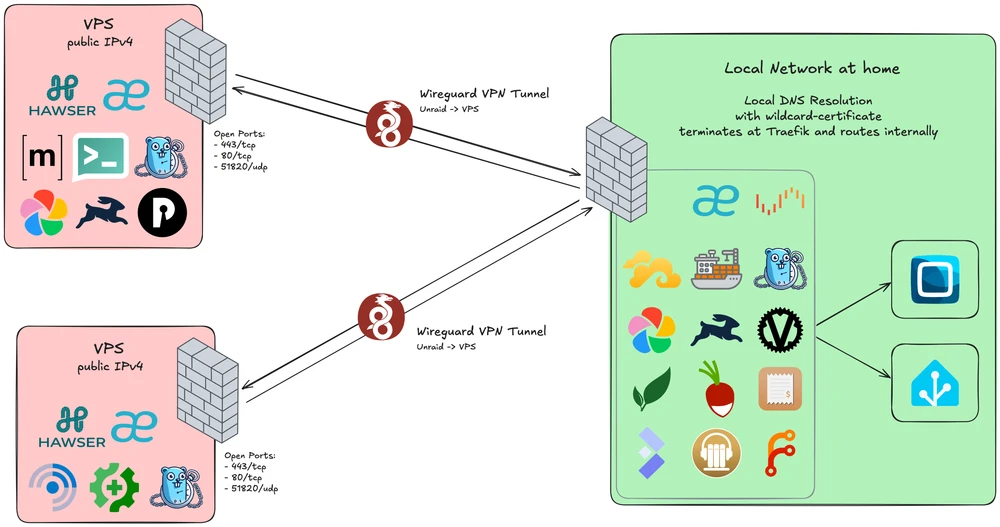
I will showcase my current self-hosting setup and talk about securely linking them together. I have been self-hosting for a long time, and my setup has evolved over the years. I am currently running a mix of services on an Unraid server at home and two VPS at the German provider IONOS, all connected securely via WireGuard.
Unraid Server at Home#
As a programmer you quickly realize that you want a simple and flexible way to run your services, and for me, that is Unraid. Unraid is a Linux-based operating system that allows you to run Docker containers and virtual machines with ease.
Before Unraid, I had a more traditional setup with a Linux server and manually configured services, but Unraid has made it so much easier to manage my self-hosted applications. Especially with the built-in support for WireGuard tunnels and also giving me a simple NAS solution for my media files and backups.
I will not go into details and comparisons about Unraid vs. other solutions, but I can highly recommend it for anyone looking to get into self-hosting. Luckily for me, my license is lifetime, so I don’t have to worry about subscription fees, but even if you have to pay for it, I think it’s worth it for the ease of use and features it provides.
On this system I also run a VM for my OpenCCU instance, which is a Homematic control unit that manages my heating valves and related devices.
The traefik reverse proxy running on Unraid also handles routing for the OpenCCU and Home Assistant instance, so I can access it securely from my local network.
Public VPS with static IPv4#
In the last year, I have started moving public services to servers with static IPv4 and to the German provider IONOS, and I am currently running two VPS, one with 2 vCores and 2GB Ram and another with 6 vCores and 8GB Ram. Before that, I had public services running on my home server, but I wanted to have a more secure separation between my home network and the public services, and also have better uptime and performance for those services. Problems with my ISP and the fact that I have a dynamic IP address also played a role in this decision.
Ionos offers a “Firewall” that allows me to create rules to restrict access to my VPS, which is a great way to add an extra layer of security to my public services. The only Ports open to the public are the ones for WireGuard and Traefik. Any other access is only possible via the WireGuard tunnel.
WireGuard for Secure Connectivity#
All my systems are connected securely via WireGuard, which is a modern VPN protocol that is fast, secure, and easy to set up.
I run WireGuard on both of my VPS, and my Unraid server connects to each of them, so I have a secure tunnel between my home network and the servers. This allows me to route traffic between the two environments without exposing them directly to the internet.
To connect to my Unraid services without exposing them, I use a WireGuard tunnel directly to my router. This tunnel can stay open most of the time, because of the low Overhead and low extra battery usage on my phone.
This connection lets me manage all my containers with a Dockhand service running on Unraid, which connects to the Hawser agents on both VPS, allowing me to GitOps all my containers.
Local HTTPS with Traefik#
The local Traefik instance on Unraid also handles TLS termination for my local services, so I can access them securely with HTTPS even on my local network.
This is especially useful for services like Home Assistant, so I can use all the features that require HTTPS without having to worry about certificates or security warnings in the browser.
My router is set up to route all traffic of a wildcard domain to the Unraid server.
Luckily, Traefik has built-in support for Let’s Encrypt, so I can easily get valid certificates for my local services with DNS challenge, which is a great option for local services that are not directly accessible from the internet.
Router and Firewall Configuration#
My router is configured to only allow incoming traffic to WireGuard, while blocking all other unsolicited traffic. I have set up a multi-zone firewall configuration to ensure that my home network is protected from potential threats.
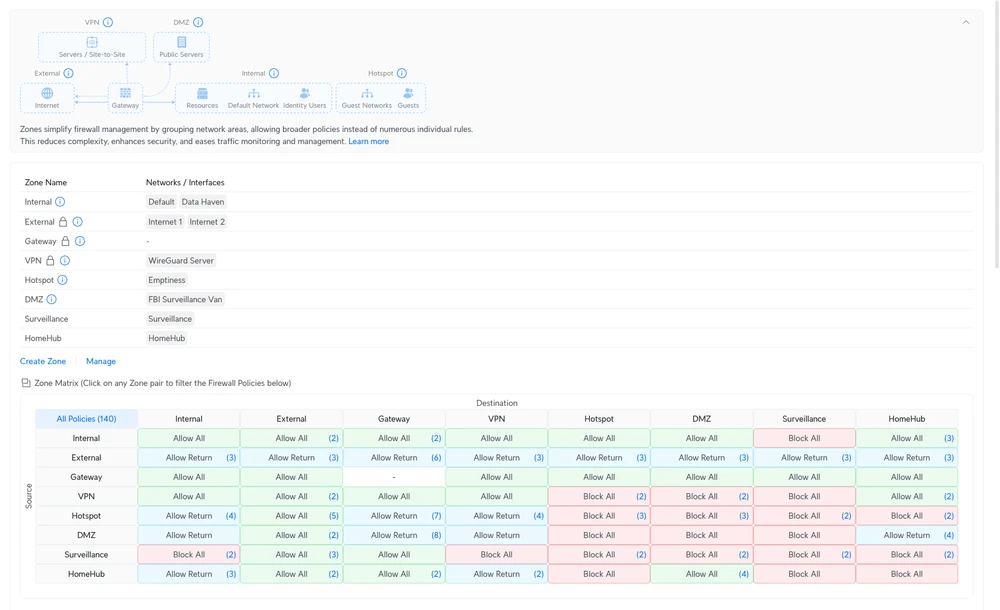
All my IoT devices and less secure services are on a separate VLAN with strict outbound rules, while my trusted devices and servers have more relaxed rules but still require authentication for access. This way, even if one of my IoT devices gets compromised, it won’t have access to my critical services or data.
Using an extra VLAN (HomeHub) for my Unraid server, Home Assistant and OpenCCU also adds an extra layer of security, as it isolates the server from the rest of my home network while still allowing it to communicate with the necessary services and the internet.
Service and Server Overview#
#1 Unraid Server#
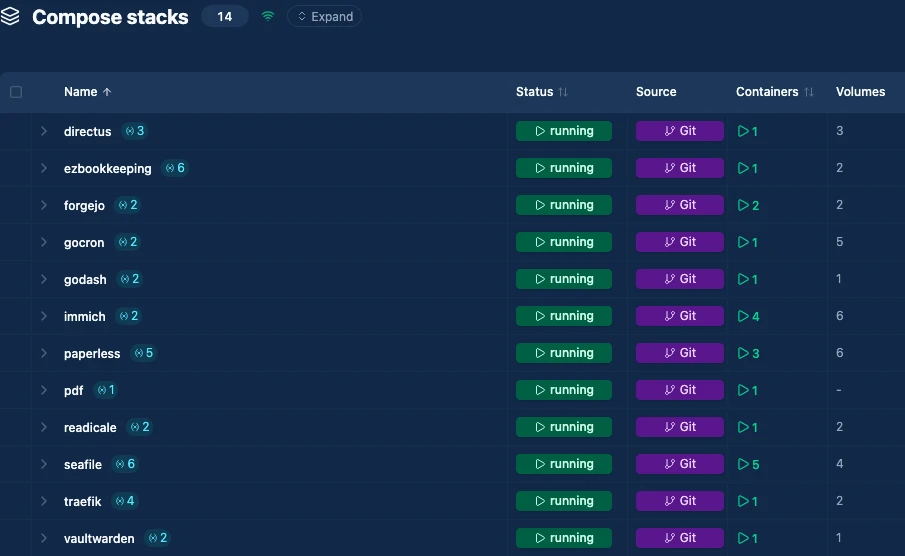
| Service | Description |
|---|---|
| Traefik | Reverse proxy and load balancer that terminates TLS and routes internal traffic to my services. |
| Seafile | File sync and sharing platform I use to keep documents and projects in sync across all my devices. |
| Dockhand | Web UI for managing Docker containers and stacks on my Unraid host. |
| Gocron | Central scheduler for all my recurring jobs like backups, cleanups, and maintenance tasks. |
| Immich | Photo and video library that automatically ingests, organizes, and backs up images from my devices. |
| Directus | Headless CMS where I model and edit content that is later rendered by Hugo for this blog. |
| Vaultwarden | Password manager backing all my credentials, shared secrets, and autofill across browsers and devices. |
| Paperless | Document archive with OCR search for invoices, letters, and scanned paperwork. |
| Radicale | CalDAV/CardDAV backend that stores my calendars and contacts for use across apps and devices. |
| ezBookkeeping | Lightweight accounting app I use to track expenses, income and other finances. |
| BentoPDF | A really good PDF-Toolkit to edit and convert PDF files. |
| AudiobookShelf | Library for organizing and streaming my podcasts. |
| Forgejo | Git hosting platform for my personal and infrastructure repositories, similar in workflow to GitHub/GitLab. |
#2 Home Assistant Green#
Using the official Hardware gives me a way to support this amazing software. I also bought the ZBT-2 Zigbee Antenna and couldn’t be happier with the quality and performance of both.
| Service | Description |
|---|---|
| Home Assistant | Main automation hub that connects sensors, switches, and integrations to drive my smart home routines. |
| Node-Red | Flow-based automation layer I use for more complex logic and cross-system workflows on top of Home Assistant. |
#3 Unraid VM#
Raspberry-Matic rebranded this year thanks to the opening of the CCU Software by Homematic. Locally talking to a Thermostat, in times of vender-locking and cloud services, a very refreshing take.
| Service | Description |
|---|---|
| OpenCCU | Homematic control unit to manage hardware locally. |
#4 VPS - 2 vCores, 2GB Ram#
Here i run a few public services that need to be accessible but do not use a lot of resources.
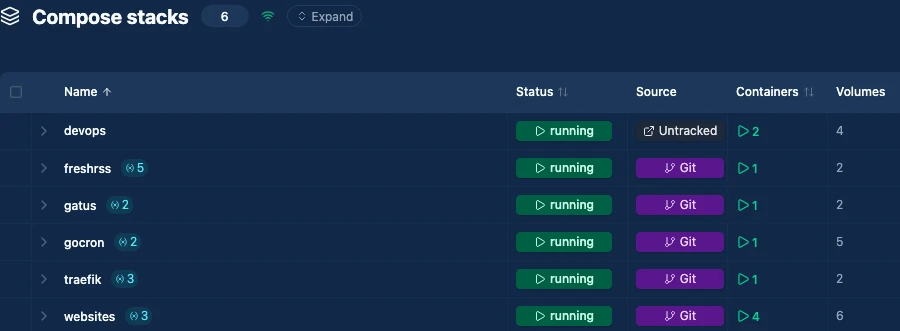
| Service | Description |
|---|---|
| Traefik | Reverse proxy that terminates TLS for my public services and routes traffic inside the docker network. |
| Hawser | Dockhand agent that connects to the Dockhand instance on my Unraid server, allowing me to manage the VPS containers. |
| Gocron | Central scheduler for all my recurring jobs like backups, cleanups, and maintenance tasks. |
| FreshRSS | RSS reader that I use to keep track of news, blogs, and updates from my favorite sources. |
| Gatus | Uptime monitoring tool that checks the availability of my public services and alerts me if something goes down. |
| Websites | Some NGINX containers that I use to host static websites like this blog. |
#5 VPS - 6 vCores, 8GB Ram#
Because of the public Immich instance and the Directus CMS, I needed a more powerful server to run those services, so I got this VPS with more resources.
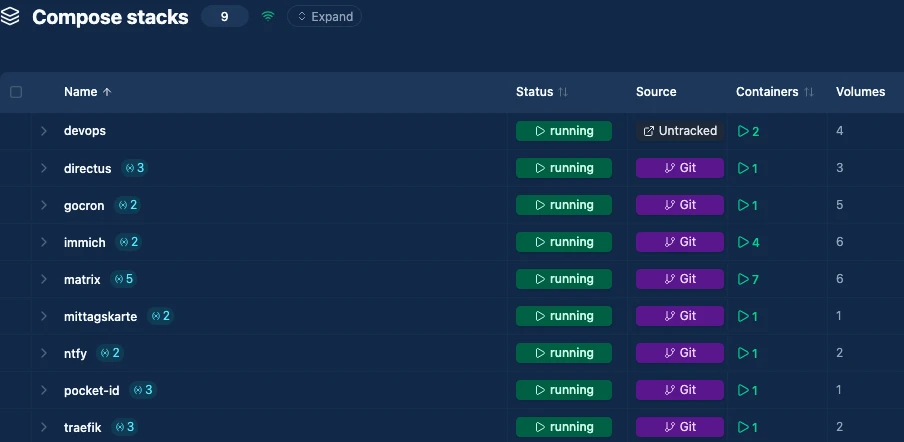
| Service | Description |
|---|---|
| Traefik | Reverse proxy that terminates TLS for my public services and routes traffic inside the docker network. |
| Hawser | Dockhand agent that connects to the Dockhand instance on my Unraid server, allowing me to manage the VPS containers. |
| Gocron | Central scheduler for all my recurring jobs like backups, cleanups, and maintenance tasks. |
| NTFY | Simple notification service that I use to send alerts and notifications to my devices and apps. |
| Element | Matrix client I use for secure, decentralized messaging. |
| Mittagskarte | A project of mine, that crawls restaurants for lunch menus. |
| Immich | My public Photo and video library that I can use to share and organize public media collections. |
| Directus | Headless CMS for any publicly accessible content management needs. |
| Pocket-ID | Identity and access management solution I use to authenticate with OIDC on most of my services. |